---
title: How do I Set Up Chillicon Power Remote Monitoring for Automatic SREC Reporting?
description: To enable automatic SREC reporting, Sol Systems needs installer-level viewing access to your site in the Chillicon Power Remote Monitoring portal. Once access is granted, Sol Systems will automatically collect energy production data each month.
---
[Skip to content](https://help.srecs.solsystems.com/how-to-set-up-chillicon-power-remote-monitoring-for-automatic-reporting#main-content)
English - United States
Show submenu for translations

Open main navigation
Close main navigation
- English - United States
Show submenu for translations
- [Contact us](mailto:info@solsystems.com)
[Contact us](mailto:info@solsystems.com)
How can we help you?
- There are no suggestions because the search field is empty.
1. [Sol Systems Knowledge Base](https://help.srecs.solsystems.com/?hsLang=en-us)
2. [Remote Monitoring](https://help.srecs.solsystems.com/remote-monitoring?hsLang=en-us)
# How do I Set Up Chillicon Power Remote Monitoring for Automatic SREC Reporting?
## To enable automatic SREC reporting, Sol Systems needs installer-level viewing access to your site in the Chillicon Power Remote Monitoring portal. Once access is granted, Sol Systems will automatically collect energy production data each month.
### **What access does Sol Systems need?**
Please provide access to **info@solsystems.com** with the following settings:
- **Account type:** Installer
- **Monitoring type:** Installer View
### **Step-by-step: How to add Sol Systems in Chillicon**
#### **Step 1: Log in to your Chillicon Power account**
Log in to your **Chillicon Power Remote Monitoring** portal.
#### **Step 2: Open user settings**
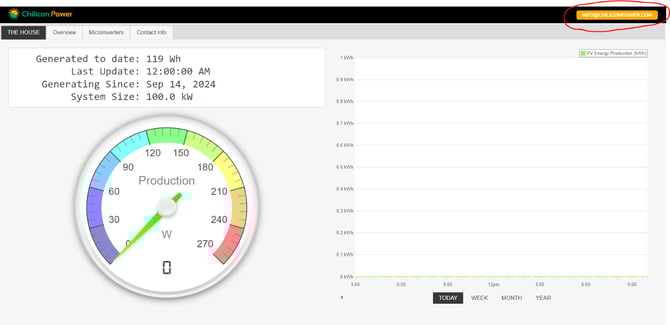
- Click your **email address** in the top-right corner of the screen
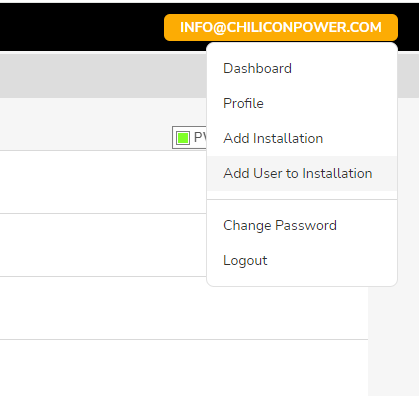
- Select **Add User to Installation**
****
#### **Step 3: Add Sol Systems as a user**
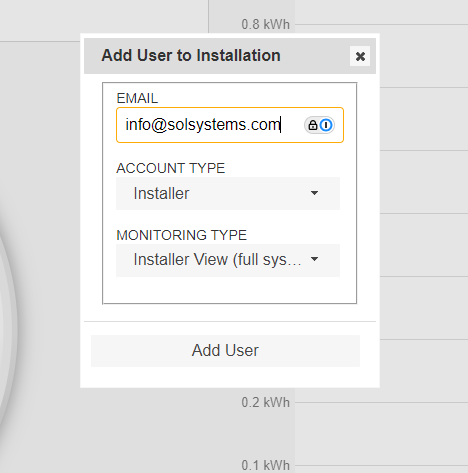
- Enter the email address: **info@solsystems.com**
- Set **Account Type** to **Installer**
- Set **Monitoring Type** to **Installer View**
- Click **Add User**
****
- [FAQs](https://help.srecs.solsystems.com/faqs?hsLang=en-us)
- [Signing Up: Everything You Need to Know](https://help.srecs.solsystems.com/signing-up-everything-you-need-to-know?hsLang=en-us)
- [Contract Offerings](https://help.srecs.solsystems.com/contract-offerings?hsLang=en-us)
- [State Markets](https://help.srecs.solsystems.com/state-markets?hsLang=en-us#main-content)
- [Washington, DC](https://help.srecs.solsystems.com/state-markets?hsLang=en-us#washington-dc)
- [Maryland](https://help.srecs.solsystems.com/state-markets?hsLang=en-us#maryland)
- [Pennsylvania](https://help.srecs.solsystems.com/state-markets?hsLang=en-us#pennsylvania)
- [Virginia](https://help.srecs.solsystems.com/state-markets?hsLang=en-us#virginia)
- [New Jersey](https://help.srecs.solsystems.com/state-markets?hsLang=en-us#new-jersey)
- [Massachusetts](https://help.srecs.solsystems.com/state-markets?hsLang=en-us#massachusetts)
- [Ohio](https://help.srecs.solsystems.com/state-markets?hsLang=en-us#ohio)
- [Delaware](https://help.srecs.solsystems.com/state-markets?hsLang=en-us#delaware)
- [Payments](https://help.srecs.solsystems.com/payments?hsLang=en-us)
- [SREC Basics](https://help.srecs.solsystems.com/srec-basics?hsLang=en-us)
- [Meter Readings](https://help.srecs.solsystems.com/meter-readings?hsLang=en-us)
- [Remote Monitoring](https://help.srecs.solsystems.com/remote-monitoring?hsLang=en-us)
- [Change of Ownership & System Expansions](https://help.srecs.solsystems.com/change-of-ownership-system-expansions?hsLang=en-us)
[](https://www.solsystems.com/)
[mailto:email@email.com](mailto:email@email.com)
Copyright © 2026, Sol Systems