
What access does Sol Systems need?
Sol Systems requires site-level access in PWRfleet in order to retrieve monthly energy production data.
Please provide access to info@solsystems.com.
Step-by-step: How to provide PWRfleet access to Sol Systems
Step 1: Log in to PWRfleet
Log in to the PWRfleet monitoring portal as an Administrative User.
Step 2: Establish a company association (one-time step)
Before sharing a site, you must create a company association between your account and Sol Systems. This is a one-time step and makes it easier to share additional sites in the future.
-
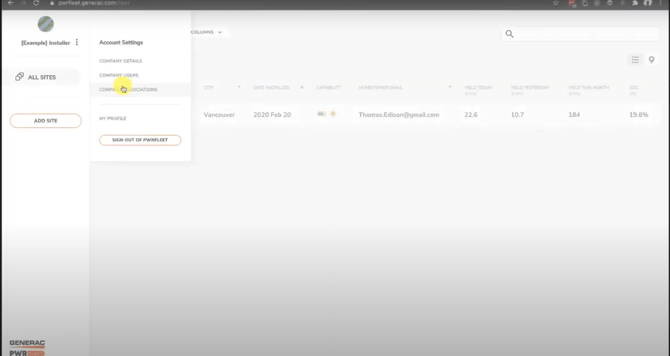
Click the Settings icon in the upper-left corner of the application
-
Select Company Association
-
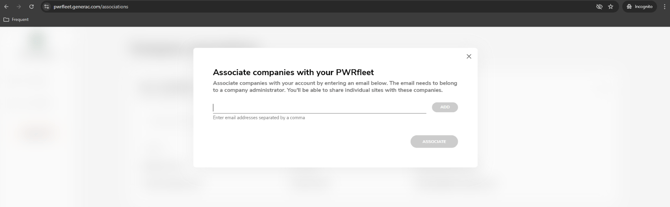
Under “Your financing and O&M partners”, click Request Association
Enter info@solsystems.com and click Associate
Step 3: Notify Sol Systems
After submitting the association request, email info@solsystems.com to let us know.
Sol Systems must accept the request before you can share a site.
Step 4: Share your site with Sol Systems
Once the association has been accepted:
-
Go to your PWRfleet home page
-
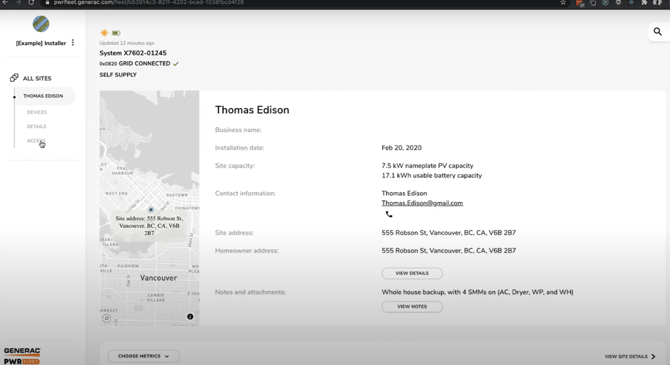
Select the site you want to share
-
Click Access
-
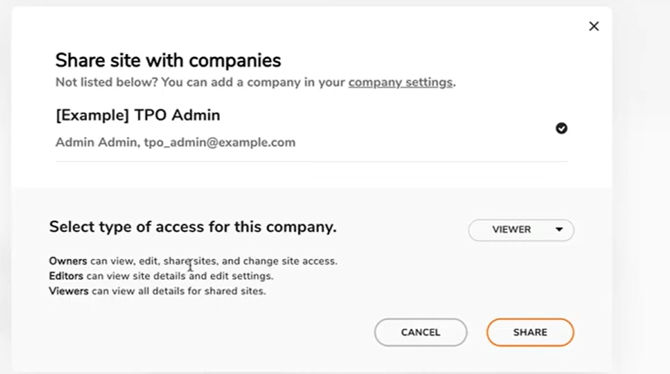
Choose Share site
-
Select Sol Systems from the list of companies
Please grant at least “Viewer” access, which is the minimum level required for Sol Systems to view monthly production readings.
How do I tell Sol Systems which site to use?
To help us locate your production data, please provide your PWRfleet site name.
You can do this by:
-
Entering your PWRfleet site name as your External System Name in the Sol Dashboard, or
-
Emailing your PWRfleet site name directly to info@solsystems.com if you do not see the prompt in the Dashboard