Skip to content
English - United States
  • There are no suggestions because the search field is empty.

How do I Set Up Chillicon Power Remote Monitoring for Automatic Reporting?

To enable automatic SREC reporting, Sol Systems needs installer-level viewing access to your site in the Chillicon Power Remote Monitoring portal. Once access is granted, Sol Systems will automatically collect energy production data each month.

What access does Sol Systems need?

Please provide access to info@solsystems.com with the following settings:

  • Account type: Installer

  • Monitoring type: Installer View

Step-by-step: How to add Sol Systems in Chillicon

Step 1: Log in to your Chillicon Power account

Log in to your Chillicon Power Remote Monitoring portal.

Step 2: Open user settings

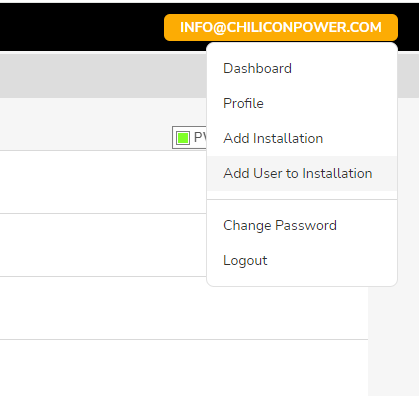
  • Click your email address in the top-right corner of the screen
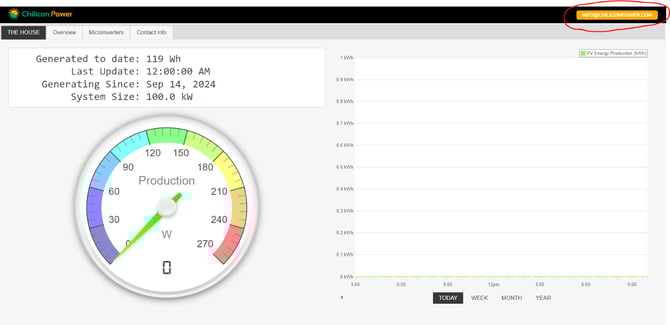
A screenshot of a computerDescription automatically generated

  • Select Add User to Installation

A screenshot of a computerDescription automatically generated

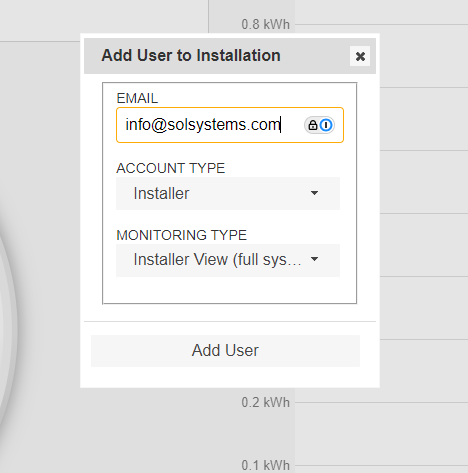
Step 3: Add Sol Systems as a user

  • Enter the email address: info@solsystems.com

  • Set Account Type to Installer

  • Set Monitoring Type to Installer View

  • Click Add User

A screenshot of a computerDescription automatically generated