
Step 1: Log in to SolarEdge
-
Log in to the SolarEdge Monitoring Platform.
-
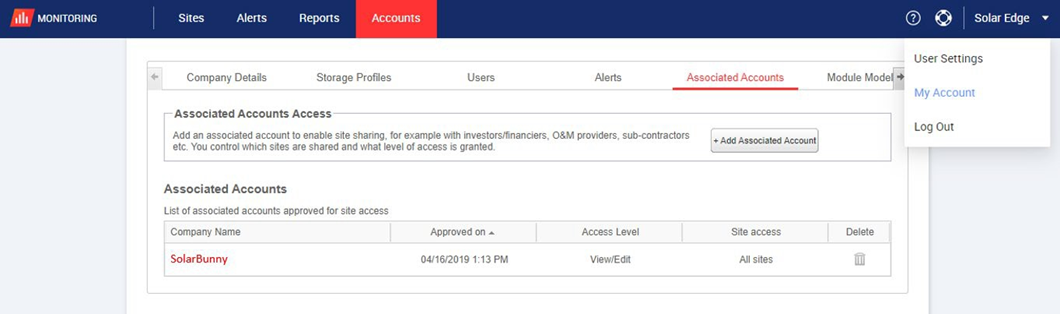
In the top-right corner, click your username.
-
Select My Account from the dropdown menu.
-
In the top navigation bar, click Associated Accounts.\
Step 2: Add Sol Systems as an Associated Account
-
Click + Add Associated Account.
-
In the Email field, enter:
info@solsystemscompany.com -
Click Save.
This sends an association invitation to Sol Systems.
Step 3: Notify Sol Systems
After sending the invitation:
-
Email info@solsystems.com (or your Sol Systems contact) to let us know the invitation has been sent.
-
Sol Systems must accept the invitation before access is active.
Once accepted, no further action is required unless you want to manage site-level access.
After Setup: What Happens Next
-
Sol Systems will be able to monitor your system for SREC reporting
-
You may grant or adjust site-level access as needed in SolarEdge
-
This supports automatic SREC reporting going forward
Common Questions
Do I need to repeat this for every site?
No. This is a one-time setup per SolarEdge account.
Does this give Sol Systems control of my system?
No. This only provides monitoring access.
What if I entered the wrong email address?
You can remove or resend the invitation from the Associated Accounts menu.