---
title: "Step 1: Create Your Account"
description: Creating your account in the Sol Systems Dashboard
---
[Skip to content](https://help.srecs.solsystems.com/step-1-create-your-account#main-content)
English - United States
Show submenu for translations

Open main navigation
Close main navigation
- English - United States
Show submenu for translations
- [Contact us](mailto:info@solsystems.com)
[Contact us](mailto:info@solsystems.com)
How can we help you?
- There are no suggestions because the search field is empty.
1. [Sol Systems Knowledge Base](https://help.srecs.solsystems.com/?hsLang=en-us)
2. [Signing Up: Everything You Need to Know](https://help.srecs.solsystems.com/signing-up-everything-you-need-to-know?hsLang=en-us)
# Step 1: Create Your Account
## Creating your account in the Sol Systems Dashboard
To get started, you (or your installer) must create an account in the Sol Systems Dashboard. In most cases, your installer already did this for your based on the email address they have on file. Here is the link: [https://srecs.solsystems.com/users/sign\_in](https://srecs.solsystems.com/users/sign_in)
Before you login, you will need to **confirm** your email address. Please check your email with the confirmation link. The email will come from info@solsystems.com:
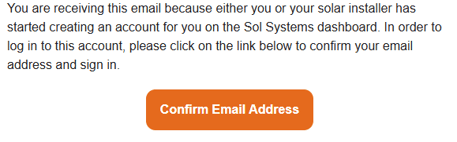
**\*please add this email address to your trusted sender list. It is critical that you receive our email updates and reminders\***
- [FAQs](https://help.srecs.solsystems.com/faqs?hsLang=en-us)
- [Signing Up: Everything You Need to Know](https://help.srecs.solsystems.com/signing-up-everything-you-need-to-know?hsLang=en-us)
- [Contract Offerings](https://help.srecs.solsystems.com/contract-offerings?hsLang=en-us)
- [State Markets](https://help.srecs.solsystems.com/state-markets?hsLang=en-us#main-content)
- [Washington, DC](https://help.srecs.solsystems.com/state-markets?hsLang=en-us#washington-dc)
- [Maryland](https://help.srecs.solsystems.com/state-markets?hsLang=en-us#maryland)
- [Pennsylvania](https://help.srecs.solsystems.com/state-markets?hsLang=en-us#pennsylvania)
- [Virginia](https://help.srecs.solsystems.com/state-markets?hsLang=en-us#virginia)
- [New Jersey](https://help.srecs.solsystems.com/state-markets?hsLang=en-us#new-jersey)
- [Massachusetts](https://help.srecs.solsystems.com/state-markets?hsLang=en-us#massachusetts)
- [Ohio](https://help.srecs.solsystems.com/state-markets?hsLang=en-us#ohio)
- [Delaware](https://help.srecs.solsystems.com/state-markets?hsLang=en-us#delaware)
- [Payments](https://help.srecs.solsystems.com/payments?hsLang=en-us)
- [SREC Basics](https://help.srecs.solsystems.com/srec-basics?hsLang=en-us)
- [Meter Readings](https://help.srecs.solsystems.com/meter-readings?hsLang=en-us)
- [Remote Monitoring](https://help.srecs.solsystems.com/remote-monitoring?hsLang=en-us)
- [Change of Ownership & System Expansions](https://help.srecs.solsystems.com/change-of-ownership-system-expansions?hsLang=en-us)
[](https://www.solsystems.com/)
[mailto:email@email.com](mailto:email@email.com)
Copyright © 2026, Sol Systems