---
title: "Step 2: Selecting a Contract & Document Upload"
description: How to select your contract and upload any additional documents
---
[Skip to content](https://help.srecs.solsystems.com/step-2-selecting-a-contract-document-upload#main-content)
English - United States
Show submenu for translations

Open main navigation
Close main navigation
- English - United States
Show submenu for translations
- [Contact us](mailto:info@solsystems.com)
[Contact us](mailto:info@solsystems.com)
How can we help you?
- There are no suggestions because the search field is empty.
1. [Sol Systems Knowledge Base](https://help.srecs.solsystems.com/?hsLang=en-us)
2. [Signing Up: Everything You Need to Know](https://help.srecs.solsystems.com/signing-up-everything-you-need-to-know?hsLang=en-us)
# Step 2: Selecting a Contract & Document Upload
## How to select your contract and upload any additional documents
Once you are logged in to your [Sol Systems Dashboard,](https://srecs.solsystems.com/users/sign_in) navigate to the "Systems" tab:

From this screen, you will see a yellow "Missing items" button:

After selecting this button, you will now see a yellow "Manage" button:

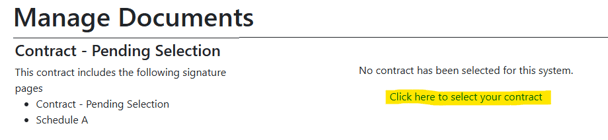
After selecting this button, you will be able to to select your contract option by selecting "Click here to select your contract:. Once the contract is selected, it will be sent to your email in addition to the Schedule A document:
Once you have completed the electronic signatures of your contract, it will be automatically upload to your Sol Systems dashboard for our records. If you are having trouble completing the Docusign packet, please see this article [here.](https://help.srecs.solsystems.com/how-to-use-docusign?hsLang=en-us)
- [FAQs](https://help.srecs.solsystems.com/faqs?hsLang=en-us)
- [Signing Up: Everything You Need to Know](https://help.srecs.solsystems.com/signing-up-everything-you-need-to-know?hsLang=en-us)
- [Contract Offerings](https://help.srecs.solsystems.com/contract-offerings?hsLang=en-us)
- [State Markets](https://help.srecs.solsystems.com/state-markets?hsLang=en-us#main-content)
- [Washington, DC](https://help.srecs.solsystems.com/state-markets?hsLang=en-us#washington-dc)
- [Maryland](https://help.srecs.solsystems.com/state-markets?hsLang=en-us#maryland)
- [Pennsylvania](https://help.srecs.solsystems.com/state-markets?hsLang=en-us#pennsylvania)
- [Virginia](https://help.srecs.solsystems.com/state-markets?hsLang=en-us#virginia)
- [New Jersey](https://help.srecs.solsystems.com/state-markets?hsLang=en-us#new-jersey)
- [Massachusetts](https://help.srecs.solsystems.com/state-markets?hsLang=en-us#massachusetts)
- [Ohio](https://help.srecs.solsystems.com/state-markets?hsLang=en-us#ohio)
- [Delaware](https://help.srecs.solsystems.com/state-markets?hsLang=en-us#delaware)
- [Payments](https://help.srecs.solsystems.com/payments?hsLang=en-us)
- [SREC Basics](https://help.srecs.solsystems.com/srec-basics?hsLang=en-us)
- [Meter Readings](https://help.srecs.solsystems.com/meter-readings?hsLang=en-us)
- [Remote Monitoring](https://help.srecs.solsystems.com/remote-monitoring?hsLang=en-us)
- [Change of Ownership & System Expansions](https://help.srecs.solsystems.com/change-of-ownership-system-expansions?hsLang=en-us)
[](https://www.solsystems.com/)
[mailto:email@email.com](mailto:email@email.com)
Copyright © 2026, Sol Systems