---
title: What is the status of my payment?
description: Learn how to track your payments, view statements, and understand when you’ll get paid.
---
[Skip to content](https://help.srecs.solsystems.com/what-is-the-status-of-my-payment#main-content)
English - United States
Show submenu for translations

Open main navigation
Close main navigation
- English - United States
Show submenu for translations
- [Contact us](mailto:info@solsystems.com)
[Contact us](mailto:info@solsystems.com)
How can we help you?
- There are no suggestions because the search field is empty.
1. [Sol Systems Knowledge Base](https://help.srecs.solsystems.com/?hsLang=en-us)
2. [FAQs](https://help.srecs.solsystems.com/faqs?hsLang=en-us)
# What is the status of my payment?
## Learn how to track your payments, view statements, and understand when you’ll get paid
**To check the status of your payment, log in to your [dashboard](https://srecs.solsystems.com/users/sign_in) and navigate to the “Payments” tab.**
Within this tab, you’ll see two sections:
---
### **1. SREC Payments**
The **Payments** tab shows all payments that have already been sent to you.

Here, you can:
- View payment amounts and dates
- Confirm whether a payment has been sent
- Download your payment statements by clicking **“View Statement”** on the right-hand side
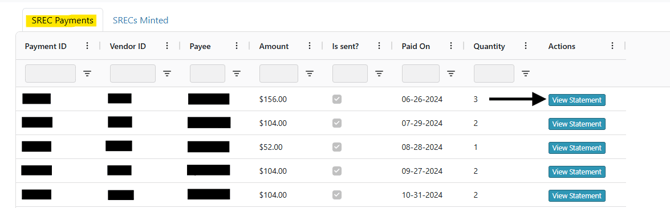
👉 If you’re looking for a completed payment, this is where to find it.
---
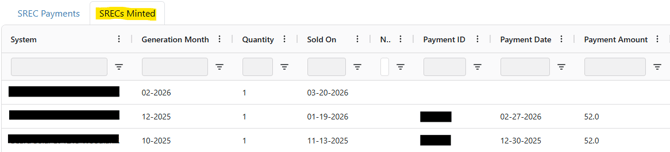
### **2. SRECs Minted**
The **SRECs Minted** tab shows both **pending and completed payments**.
“Minted” refers to when GATS (the SREC awarding entity) has issued your SRECs.
This section allows you to:
- Track newly generated credits
- See when credits were sold
- Understand upcoming payments
---
### **How payment timing works**
A credit must be **sold before it can be paid out**. Once sold, payments are issued on a **2-month delay**. Payments are always issued on the last business day of the month.
👉 For example (see screenshot below):
- 1 SREC was generated in **February**
- It was sold on **March 20, 2026**
- This means payment will be sent in the **next available payment cycle**
- For February generation, payment would be issued at the **end of April**
- **Please see our SREC Payment Schedule [HERE](https://help.srecs.solsystems.com/srec-payment-schedule?hsLang=en-us)**
****
- [FAQs](https://help.srecs.solsystems.com/faqs?hsLang=en-us)
- [Signing Up: Everything You Need to Know](https://help.srecs.solsystems.com/signing-up-everything-you-need-to-know?hsLang=en-us)
- [Contract Offerings](https://help.srecs.solsystems.com/contract-offerings?hsLang=en-us)
- [State Markets](https://help.srecs.solsystems.com/state-markets?hsLang=en-us#main-content)
- [Washington, DC](https://help.srecs.solsystems.com/state-markets?hsLang=en-us#washington-dc)
- [Maryland](https://help.srecs.solsystems.com/state-markets?hsLang=en-us#maryland)
- [Pennsylvania](https://help.srecs.solsystems.com/state-markets?hsLang=en-us#pennsylvania)
- [Virginia](https://help.srecs.solsystems.com/state-markets?hsLang=en-us#virginia)
- [New Jersey](https://help.srecs.solsystems.com/state-markets?hsLang=en-us#new-jersey)
- [Massachusetts](https://help.srecs.solsystems.com/state-markets?hsLang=en-us#massachusetts)
- [Ohio](https://help.srecs.solsystems.com/state-markets?hsLang=en-us#ohio)
- [Delaware](https://help.srecs.solsystems.com/state-markets?hsLang=en-us#delaware)
- [Payments](https://help.srecs.solsystems.com/payments?hsLang=en-us)
- [SREC Basics](https://help.srecs.solsystems.com/srec-basics?hsLang=en-us)
- [Meter Readings](https://help.srecs.solsystems.com/meter-readings?hsLang=en-us)
- [Remote Monitoring](https://help.srecs.solsystems.com/remote-monitoring?hsLang=en-us)
- [Change of Ownership & System Expansions](https://help.srecs.solsystems.com/change-of-ownership-system-expansions?hsLang=en-us)
[](https://www.solsystems.com/)
[mailto:email@email.com](mailto:email@email.com)
Copyright © 2026, Sol Systems